Facebook

Facebook post resizer

Facebook post and link preview image size

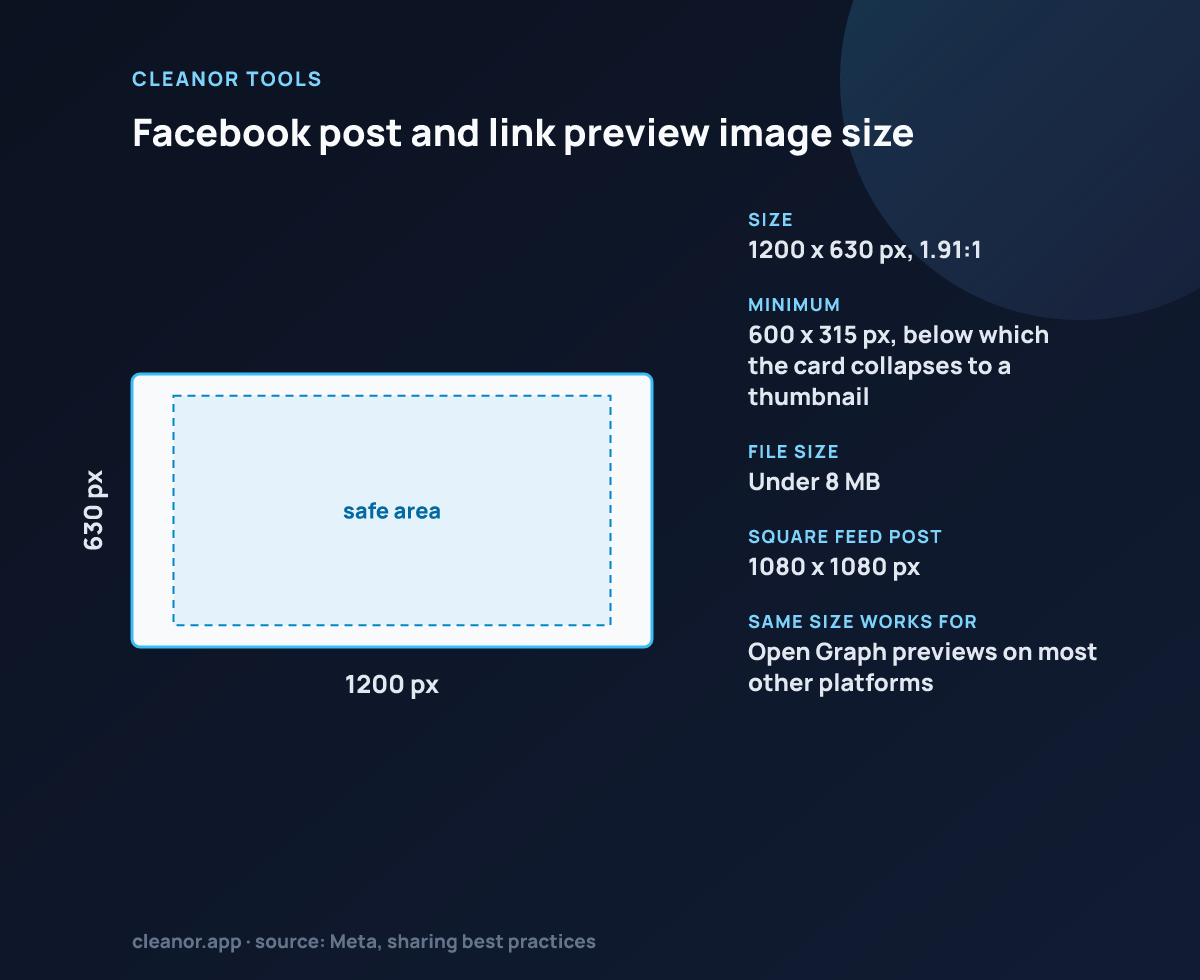
Facebook renders a shared link at 1200 by 630 pixels, which is 1.91:1. The same image is reused as the Open Graph preview across most of the web, which is why this one size is worth getting right once. Below 600 pixels wide, Facebook falls back to a small square thumbnail and the post stops looking like a link card.

Facebook post image: 1200 by 630 pixels, with the safe area that survives cropping
Facebook post image: 1200 x 630 px.
Size1200 x 630 px, 1.91:1
Minimum600 x 315 px, below which the card collapses to a thumbnail
File sizeUnder 8 MB
Square feed post1080 x 1080 px
Same size works forOpen Graph previews on most other platforms

Source: Meta, sharing best practices

Details

How to use Facebook post resizer

What the tool does, how to run it, and what to expect from the result.

How to make a 1200 x 630 Facebook post image

The 1.91:1 frame is shallow, so a normal photo loses height. Decide early whether the subject can survive the crop or whether the image should sit whole over a background.

The canvas is fixed at 1200 x 630 and everything is drawn locally, so the file never leaves the browser before you download it.

  • Upload the image you want in the post or link card.
  • Use crop to fill the 1.91:1 frame, or fill to keep the whole image over a solid background colour.
  • Drag and zoom so the subject is centred, remembering the feed renders it around 500 pixels wide.
  • Export as JPG at around 0.9 quality, since Facebook re-encodes to JPG anyway.
  • Attach it to the post, or reference the same file as og:image if you are fixing a link preview.

Why this format matters for Facebook posts

Facebook post images often need a balanced wide frame that still leaves room for the main subject, brand mark, or callout. A dedicated preset helps people judge that balance before the post goes live.

That makes this page useful for quick publishing jobs where the source image already exists and only needs correct framing for the destination.

How people usually use this

The common workflow is simple: upload the image, decide whether the frame should crop or preserve the full source, drag until the focal point feels right, then export the ready-to-post version.

  • Campaign and launch graphics
  • Link-share visuals
  • Event announcements
  • Product and promo post images
Tips

Getting a better result out of Facebook post resizer

Specific settings and thresholds, not general advice.

  • The preset is 1200 x 630, a 1.91:1 frame. That is the size Facebook uses for the large link-preview card, so the same export doubles as your og:image.
  • Facebook falls back to a small square thumbnail instead of the large card if the image is under 600 x 315 pixels. 1200 x 630 is exactly twice that floor, which is why it is the standard.
  • Feed images are displayed around 500 pixels wide on desktop and less on mobile, so a 1200-pixel-wide export is already being downscaled. Fine detail and small type will not survive.
  • Facebook re-encodes uploads to JPG regardless of what you send, so PNG mostly buys you a bigger upload rather than a cleaner post. Use JPG at 0.9 unless the graphic is flat colour.
  • If this image will also be scraped as an og:image, keep it under about 8 MB and use an absolute URL. Facebook's scraper caches the first version it sees, so re-uploading a fixed image often needs a cache refresh in the sharing debugger.
Limits

What Facebook post resizer does not do

The honest boundary, so you do not lose time finding it yourself.

  • It does not add captions, headlines or link-card text. The card title and description come from your page's meta tags, not the image.
  • It does not check whether the design has too much text. Meta no longer applies the 20 percent text rule to organic posts, but ad delivery still reacts to heavy text, and this tool cannot measure that.
  • It exports one image at a time and does not build carousels or multi-image posts.
  • It does not post to Facebook or write og:image tags for you.
At a glance

Who Facebook post resizer is for

A quick way to understand who this helps, what it solves, and where it connects next.

Best fit

People preparing social graphics, link-share images, announcements, and campaign visuals for Facebook

Ideal for

Turning one image into a share-friendly Facebook post format without opening a full design editor

FAQ

Common questions

Short answers for the questions people usually have before trying a utility like this.

What size is used for a Facebook post image here?

This page uses a 1200 × 630 preset, which fits the common wide social-share style used for many Facebook post graphics.

Can I use this for landscape graphics?

Yes. The preset is already landscape, so it works especially well for wide product, blog, event, and promo visuals.

Is any server-side processing involved?

No. The resizing and export stay inside the browser for a local-only workflow.

Why 1200 x 630 rather than a square?

1200 x 630 is the 1.91:1 frame Facebook uses for the large link preview and for shared images in the feed. It is also the size the Open Graph og:image tag expects, so one export covers both cases.

What happens if the image is smaller than 600 x 315?

Facebook drops the large image card and renders a small square thumbnail next to the link text instead, which is a much weaker unit in the feed. 600 x 315 is the floor and 1200 x 630 is the recommended size.

Can I use this file for a Facebook ad?

For a feed ad, yes as a starting point, but Meta's ad placements also want 1080 x 1080 and 1080 x 1920 variants. A single 1.91:1 file will be cropped in stories and Reels placements.

Does the 20 percent text rule still apply?

Meta retired the hard rejection rule, so a text-heavy image is no longer blocked. It can still hurt delivery and cost in paid placements, which is a reason to keep type large and sparse rather than dense.

Facebook is still showing my old image. What now?

That is the scraper cache, not the file. Run the URL through Facebook's sharing debugger and scrape it again so it picks up the new og:image.
Recommendations

You Might Also Like

Nearby tools from the catalog that fit the same job or workflow.

Cleanor app

Do it all on your device

Cleanor puts these tools in one app: compress and convert images, video, and audio, work with PDFs, and scan text right on your device. Plus free up storage and clear inbox clutter with Email Cleaner. Start with a free trial.

  • iPhone
  • Android
  • Macsoon
  • Windowssoon