Does this support JPG only?
Yes. This page is dedicated to JPG and JPEG input so the workflow stays focused on that one format switch to AVIF.
Why is the AVIF file so much smaller?
AVIF uses more modern compression than JPG, so it usually produces much smaller files at similar visual quality, which is great for web delivery.
Does it upload my JPEG to a server?
No. Conversion and export run entirely in your browser, so your image stays on your device.
Is the JPG to AVIF converter free?
Yes. It is completely free with no sign-up, no watermark, and no limit on how many images you convert.
Does it work on mobile?
Yes. The converter works in any modern mobile or desktop browser because all processing happens locally on your device.
How much smaller is AVIF than JPEG?
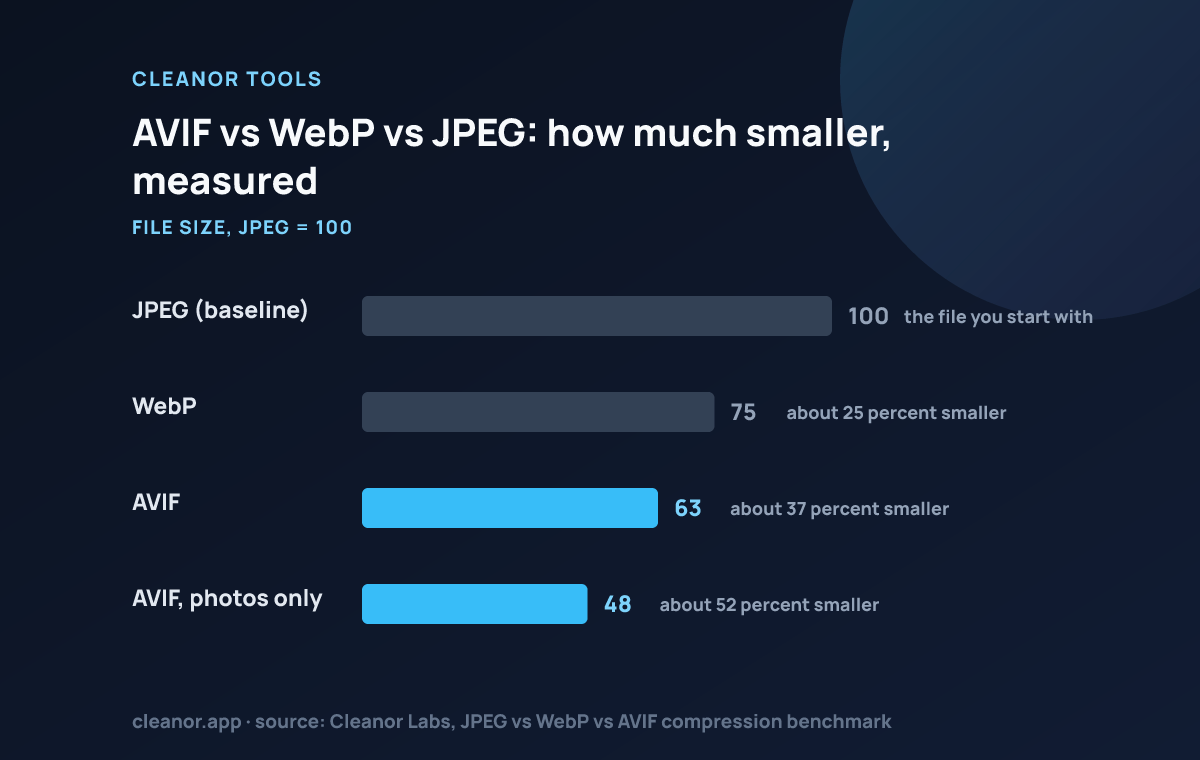
Our own benchmark measured AVIF at 37% smaller than JPEG at matched quality across the Kodak test suite, and our photo-compression study found savings as high as 52% on photographs. It is the largest single format win currently available on the web.
Why is the conversion so slow?
Because AVIF encoding is genuinely expensive, and it runs on your CPU in the browser rather than on a server. That is the price of nothing being uploaded, and it scales with the size of the image.
Should I delete the original JPG?
No. Browser support for AVIF is excellent, but email clients, older desktop software and some marketplaces still reject it. The JPG is the file you hand to anything outside a browser.
Will AVIF make a bad JPG look better?
No. It will encode the existing artefacts faithfully. The 37% saving is measured at matched quality from clean sources, not as a repair of an already-degraded file.
What about JPEG XL, isn't it better?
Technically it is strong, but our benchmark found it reaches only about 14% of browsers. AVIF is the pragmatic winner precisely because it is both efficient and actually supported.