Documents

Passport photo maker

Passport photo size and requirements

Passport photo size is not one number. The 35 by 45 mm format covers the UK, the EU and Australia. The United States uses a square 2 by 2 inch photo, and Canada uses 50 by 70 mm. What gets photos rejected more often than the size is the head height, which every country specifies separately and which a correctly sized crop can still get wrong.

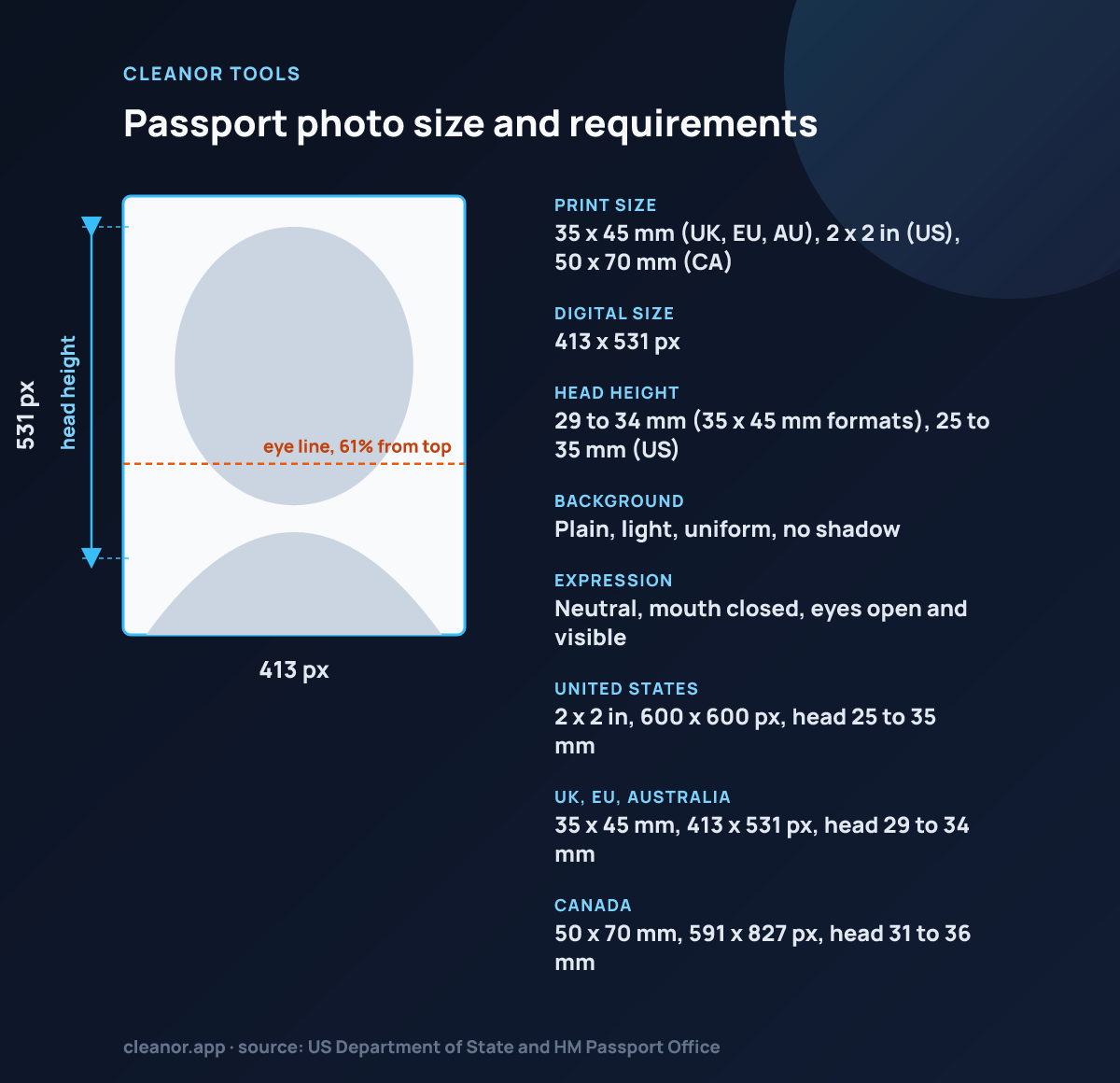
Passport photo photo size: 413 by 531 pixels, 35 x 45 mm (UK, EU, AU), 2 x 2 in (US), 50 x 70 mm (CA), head 29 to 34 mm (35 x 45 mm formats), 25 to 35 mm (US)
Passport photo: 35 x 45 mm (UK, EU, AU), 2 x 2 in (US), 50 x 70 mm (CA) (413 x 531 px), head 29 to 34 mm (35 x 45 mm formats), 25 to 35 mm (US).
Print size35 x 45 mm (UK, EU, AU), 2 x 2 in (US), 50 x 70 mm (CA)
Digital size413 x 531 px
Head height29 to 34 mm (35 x 45 mm formats), 25 to 35 mm (US)
BackgroundPlain, light, uniform, no shadow
ExpressionNeutral, mouth closed, eyes open and visible
United States2 x 2 in, 600 x 600 px, head 25 to 35 mm
UK, EU, Australia35 x 45 mm, 413 x 531 px, head 29 to 34 mm
Canada50 x 70 mm, 591 x 827 px, head 31 to 36 mm

Source: US Department of State and HM Passport Office

Details

How to use Passport photo maker

What the tool does, how to run it, and what to expect from the result.

How to make a passport photo

To make a passport photo, open Passport Photo Maker, upload a portrait, and choose the destination size preset. Zoom and reposition the image until the face sits inside the head and eye-line guides, then optionally clean up a plain light background and export. The result is a correctly proportioned document photo ready to print or upload.

Everything happens in your browser, so the portrait is never sent to a server. That keeps a highly personal photo private while you size and crop it, and it means there is no upload wait before you can adjust the framing.

  • Upload a portrait photo
  • Pick the country or document size preset
  • Zoom and reposition until the face fits the guides
  • Optionally clean up a light background, then export locally

Why document photos need a guided crop tool

Passport and ID photos are not normal social crops. The framing matters more, the background needs to stay plain, and the subject usually has to land inside a tighter head-size range than a typical portrait editor would show. Fixed presets and guide lines make hitting that target far easier.

Because the source is often already close to a document-photo look, no cloud AI is required to size and crop it. The tool focuses on a clean, guided crop and a trustworthy export rather than heavy automated edits, which is why it can stay fully local in the browser.

  • Passport and visa photo crops
  • ID and form-ready portrait exports
  • White or neutral background cleanup on bright backdrops
  • Local processing for people who do not want to upload personal portraits
Tips

Getting a better result out of Passport photo maker

Specific settings and thresholds, not general advice.

  • Each preset is a real pixel canvas, not a guideline. U.S. Passport is 600 by 600, which is 2 by 2 inches at 300 DPI. UK, Australia, and the generic ID preset are 413 by 531, which is 35 by 45 millimetres at 300 DPI. Canada is 591 by 827, which is 50 by 70 millimetres.
  • The head and eye-line guides are overlays, not detection. Nothing finds your face for you. You drag and zoom the photo until the crown-to-chin height lands inside the head band and the eyes land inside the eye band, which is exactly the check a passport clerk makes.
  • The head-height fractions differ by country and that is why one crop does not serve them all. The UK expects the head to occupy 29 to 34 millimetres of a 45 millimetre frame. Canada expects 31 to 36 millimetres of a 70 millimetre frame, which is a much smaller head in a much taller photo.
  • The background cleanup is a flood fill from the edges of the frame, not a subject cutout. It walks inward from the border and replaces anything that is bright enough and close enough to the border's average color. On a plain, evenly lit wall it works. Against a patterned wall, a shadow, or a dark background it will stop early and leave patches.
  • A JPG export always gets a white background, whatever background mode you chose, because JPEG has no alpha channel. That is usually what you want for a document photo, and it means the keep-original mode only preserves transparency if you export as PNG or WebP.
Limits

What Passport photo maker does not do

The honest boundary, so you do not lose time finding it yourself.

  • It does not detect faces or eyes. Positioning is manual, guided by the overlays.
  • The background cleanup only works on a light, plain, border-connected background. It is not an AI cutout.
  • The export carries no DPI tag, so a print lab that reads DPI rather than pixel dimensions may need the file passing through the DPI converter first.
  • It cannot judge compliance. Expression, glasses, head covering, shadows, and lighting are all rules it does not check.
At a glance

Who Passport photo maker is for

A quick way to understand who this helps, what it solves, and where it connects next.

Best fit

People preparing passport, visa, ID, and document-ready portrait photos from an existing image

Ideal for

Turning one portrait into a document-style photo with fixed ratios, head positioning guides, clean framing, and a plain light background

FAQ

Common questions

Short answers for the questions people usually have before trying a utility like this.

Is Passport Photo Maker free?

Yes. Passport Photo Maker is completely free, with no signup, and it runs entirely in your browser.

Does it upload my photo to a server?

No. Passport Photo Maker is client-side only, so your portrait stays on your device and is never sent to a remote server.

Does this remove the background with AI?

No. The tool can clean up a plain light background from the edges, but it does not run server-side segmentation or AI cutouts.

Can one preset guarantee my passport photo is accepted?

No browser tool can guarantee acceptance, since final rules depend on the country, lighting, expression, and submission context. The presets and guides make it much easier to prepare the crop, head position, and background correctly.

Does it work on mobile?

Yes. Passport Photo Maker runs in any modern browser, including on phones and tablets, with nothing to install.

Will a photo from this tool be accepted?

It can be, and no tool can promise it. The presets get the canvas size, the head-height band, and the eye line right, which is what most rejections are about. What they cannot check is everything else the rules cover: a neutral expression, no glare on glasses, no shadow behind the head, no shadow across the face, both ears visible where required, and a recent capture. Read your issuing authority's checklist alongside the guides.

How does the background cleanup actually work?

It samples the border of the frame to learn the background's average color, then floods inward from the edges, replacing every connected pixel that is bright enough and close enough to that average. Because it is connectivity-based, it stops wherever the wall gets dark or busy. A plain, evenly lit bright wall gives a clean result. A textured wall gives a patchy one, and the honest answer is to reshoot against something plain.

Why is my exported photo not 300 DPI?

Because a browser canvas export carries no density tag. The pixel dimensions are correct, and 600 by 600 pixels printed at 2 by 2 inches is 300 DPI by definition, so most labs and home printers handle it fine. If a print service specifically checks for a DPI value in the file, run the export through the Image DPI Converter and set 300, which writes the tag without touching a pixel.

How do I use the head and eye guides?

Zoom and drag the photo until two things are true at once: the top of your head and your chin fall inside the head-height band, and your eyes sit inside the horizontal eye-line band. Zoom runs from 1x to 2.5x. Those two constraints together are what fix a passport crop, and getting one right while ignoring the other is the most common reason a photo comes back.

Is my photo uploaded anywhere?

No, and for a document photo that is the point. A passport photo is a biometric image of your face, tied to an application. All the cropping, the background fill, and the encoding happen on a canvas in the page on your own device. The only network call is a credit counter carrying the tool name.
Recommendations

You Might Also Like

Nearby tools from the catalog that fit the same job or workflow.

Cleanor app

Do it all on your device

Cleanor puts these tools in one app: compress and convert images, video, and audio, work with PDFs, and scan text right on your device. Plus free up storage and clear inbox clutter with Email Cleaner. Start with a free trial.

  • iPhone
  • Android
  • Macsoon
  • Windowssoon