ID

ID photo maker

ID photo size and requirements

There is no single ID photo size. The 35 by 45 mm format covers the UK, the EU and Australia; the United States uses a square 2 by 2 inch photo; Canada uses 50 by 70 mm, which is larger than both. Printing the wrong one is the most common reason an application comes back.

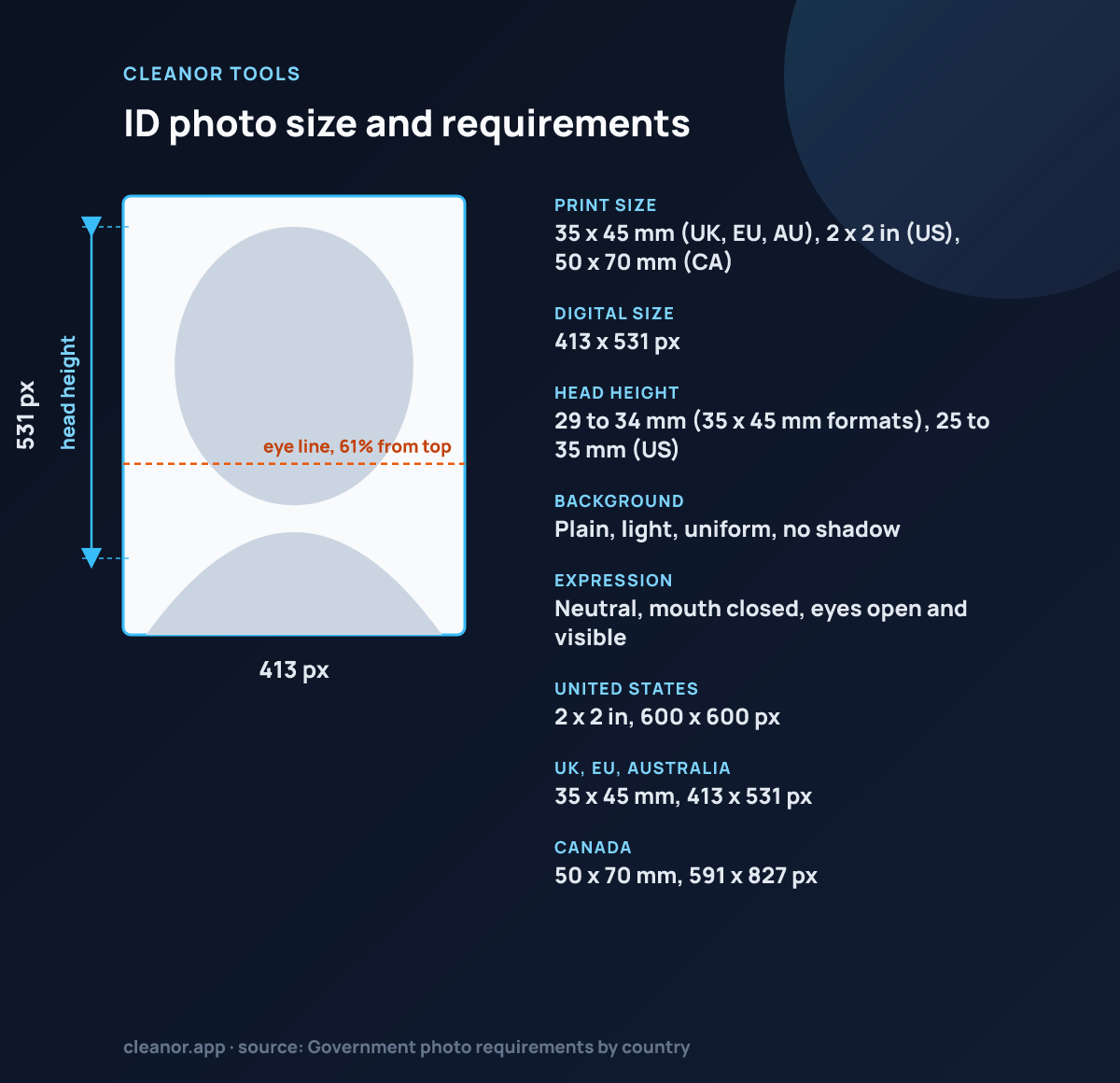
ID photo photo size: 413 by 531 pixels, 35 x 45 mm (UK, EU, AU), 2 x 2 in (US), 50 x 70 mm (CA), head 29 to 34 mm (35 x 45 mm formats), 25 to 35 mm (US)
ID photo: 35 x 45 mm (UK, EU, AU), 2 x 2 in (US), 50 x 70 mm (CA) (413 x 531 px), head 29 to 34 mm (35 x 45 mm formats), 25 to 35 mm (US).
Print size35 x 45 mm (UK, EU, AU), 2 x 2 in (US), 50 x 70 mm (CA)
Digital size413 x 531 px
Head height29 to 34 mm (35 x 45 mm formats), 25 to 35 mm (US)
BackgroundPlain, light, uniform, no shadow
ExpressionNeutral, mouth closed, eyes open and visible
United States2 x 2 in, 600 x 600 px
UK, EU, Australia35 x 45 mm, 413 x 531 px
Canada50 x 70 mm, 591 x 827 px

Source: Government photo requirements by country

Details

How to use ID photo maker

What the tool does, how to run it, and what to expect from the result.

How to crop a 35 x 45 mm ID photo

The whole task is getting the head into the right proportion of the frame and the eyes onto the right line, then getting the background clean enough to pass.

The preset is locked to 413 x 531 pixels, the 300 DPI equivalent of 35 x 45 mm, and all the processing is local.

  • Upload a straight-on portrait taken against a plain, bright wall.
  • Zoom until the head fills the crown-to-chin band drawn on the guides, roughly 62 to 74 percent of the frame height.
  • Drag the photo vertically until the eyes sit inside the marked eye band.
  • If the wall is light but slightly off-colour, switch background cleanup to white or neutral.
  • Export as JPG and check the head and eye positions against the exact rules your issuing authority publishes before you submit or print.

Why ID photos need a guided crop

ID photos are less about creative editing and more about consistency. The face needs to sit in a predictable area, the background should stay plain, and the final crop needs to feel document-ready instead of casually framed.

A locked document preset helps because it removes guesswork about the output shape and keeps the job focused on alignment, not design.

What this page helps with

This works best when someone already has a front-facing portrait and needs to turn it into a practical ID-style photo without sending a personal image to a cloud editor.

  • Student and membership IDs
  • Resident and document card portraits
  • Simple form and profile document uploads
  • 35 × 45 mm document-style exports
Tips

Getting a better result out of ID photo maker

Specific settings and thresholds, not general advice.

  • The locked preset is the generic 35 x 45 mm ID format, exported at 413 x 531 pixels. That is exactly 35 x 45 mm at 300 DPI, which is the print resolution most photo labs and ID offices expect.
  • The overlay guides target a head height of 62 to 74 percent of the frame, which on a 45 mm tall photo is roughly 28 to 33 mm from chin to crown. Most ID standards in this format live inside that band.
  • The eye-line band sits at 57 to 64 percent of the height measured from the top, which is where nearly every 35 x 45 mm standard wants the eyes. If your eyes are outside the band, drag the photo rather than zooming further.
  • The white and neutral cleanup modes are a flood fill from the edges of the frame. They only replace background pixels that are already light, connected to the border and within tolerance of the sampled edge colour, so a plain bright wall works and a patterned or dark backdrop does not.
  • Export as JPG for anything you will upload, PNG only if a lab asks for it. The canvas does not embed a DPI tag, so if a printer asks for 300 DPI you set that at print time; the pixel dimensions are what carry the size.
Limits

What ID photo maker does not do

The honest boundary, so you do not lose time finding it yourself.

  • It does not check compliance. There is no face detection, no head-height measurement and no accept-or-reject verdict, only guides that you line the photo up against.
  • The background cleanup cannot cut a person out of a busy, dark or coloured backdrop. It is an edge flood fill, not an AI segmentation model.
  • It does not remove glasses glare, shadows on the wall behind you, or a tilted head.
  • It does not produce a print sheet. There is no 4 x 6 inch layout with multiple copies tiled on it.
At a glance

Who ID photo maker is for

A quick way to understand who this helps, what it solves, and where it connects next.

Best fit

People preparing national ID, resident card, student card, and form-ready portrait photos from an existing image

Ideal for

Turning one portrait into a standard 35 × 45 mm ID-style photo with fixed framing and plain-background cleanup

FAQ

Common questions

Short answers for the questions people usually have before trying a utility like this.

What size does this ID photo page use?

This page uses a standard 35 × 45 mm style preset, which is a common baseline for many ID and document photos.

Does this use AI background removal?

No. It uses local background cleanup tuned for already bright, plain backgrounds rather than server-side AI cutouts.

Is the photo processed locally?

Yes. Upload, framing, guides, and export all run in the browser on the device.

What size is a standard ID photo?

35 x 45 mm is the most widely used ID and visa photo format outside the United States. At 300 DPI that is 413 x 531 pixels, which is what this page exports.

Is 35 x 45 mm right for a US document?

No. US passports and US visas use a 2 x 2 inch square, which is 600 x 600 pixels at 300 DPI. Use the US passport photo page for those, not this one.

How big should my head be in the photo?

For a 35 x 45 mm photo, most standards want the head from chin to crown to measure roughly 29 to 34 mm, which is the band the on-screen guides mark out. Check the exact figure your issuing authority publishes, since it varies by a few millimetres.

What does the background cleanup actually do?

It samples the colour of the bright pixels around the border, then flood fills inward across connected pixels that are both light and close to that colour, blending them toward white or a neutral tone. It stops at your hair and shoulders because those fail the brightness test. It will not work against a dark or coloured wall.

Can I use a phone selfie?

Technically yes, but wide-angle selfie lenses distort face proportions at arm's length and most authorities reject photos taken that close. Stand a couple of metres from a plain light wall and have someone else take it with the rear camera.

Does the photo get uploaded anywhere?

No. The image is decoded into a canvas in the browser and the crop, background cleanup and encoding all run on your device. Nothing is sent to a server, which matters more than usual for a document photo.
Recommendations

You Might Also Like

Nearby tools from the catalog that fit the same job or workflow.

Cleanor app

Do it all on your device

Cleanor puts these tools in one app: compress and convert images, video, and audio, work with PDFs, and scan text right on your device. Plus free up storage and clear inbox clutter with Email Cleaner. Start with a free trial.

  • iPhone
  • Android
  • Macsoon
  • Windowssoon