Visa

Visa photo maker

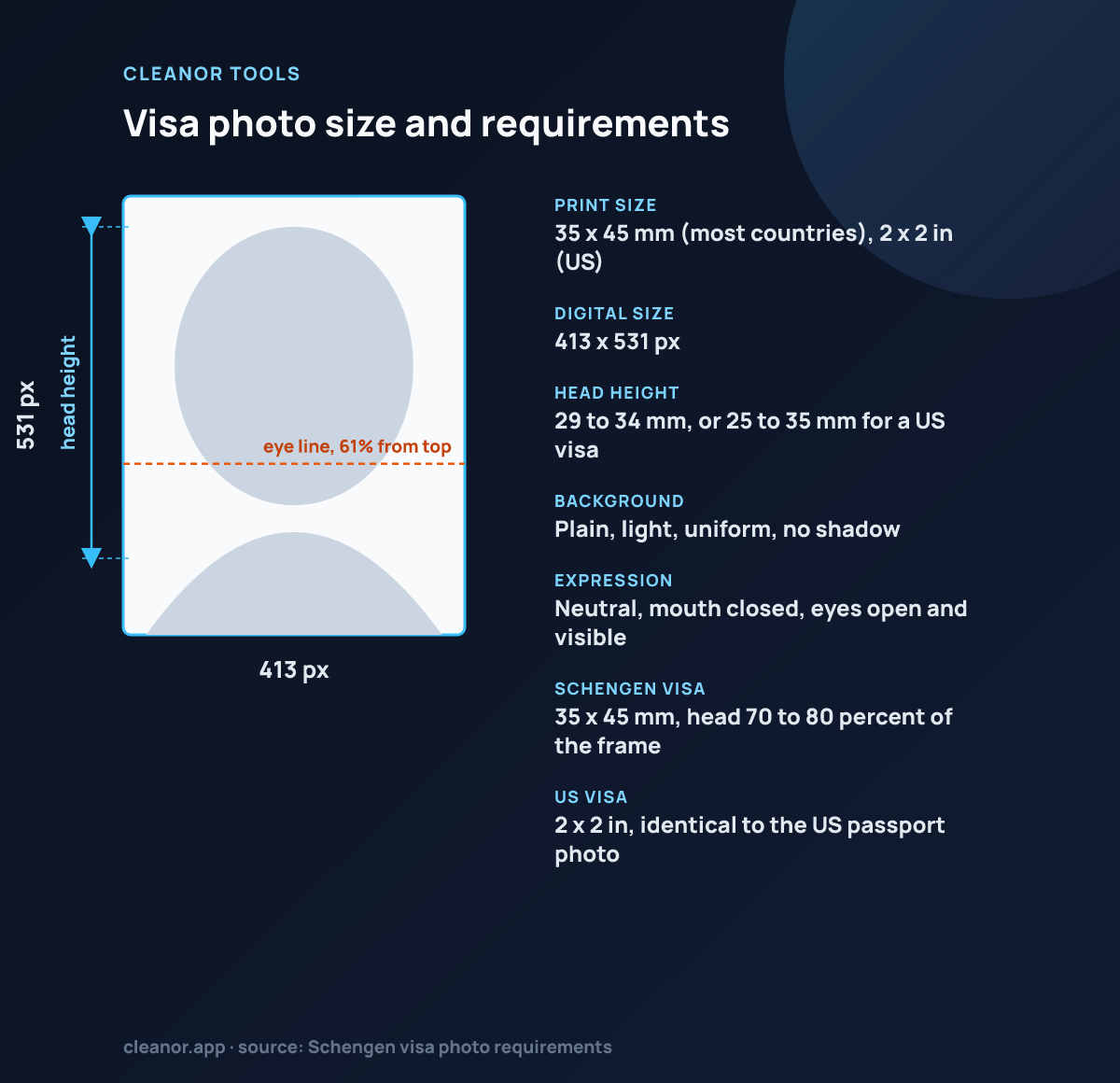
Visa photo size and requirements

Most of the world uses 35 by 45 mm for a visa photo. The United States is the exception and uses the same square 2 by 2 inch photo as its passport. A Schengen visa additionally requires the head to fill 70 to 80 percent of the frame, which is stricter than the millimetre range alone suggests.

Visa photo photo size: 413 by 531 pixels, 35 x 45 mm (most countries), 2 x 2 in (US), head 29 to 34 mm, or 25 to 35 mm for a US visa
Visa photo: 35 x 45 mm (most countries), 2 x 2 in (US) (413 x 531 px), head 29 to 34 mm, or 25 to 35 mm for a US visa.
Print size35 x 45 mm (most countries), 2 x 2 in (US)
Digital size413 x 531 px
Head height29 to 34 mm, or 25 to 35 mm for a US visa
BackgroundPlain, light, uniform, no shadow
ExpressionNeutral, mouth closed, eyes open and visible
Schengen visa35 x 45 mm, head 70 to 80 percent of the frame
US visa2 x 2 in, identical to the US passport photo

Source: Schengen visa photo requirements

Details

How to use Visa photo maker

What the tool does, how to run it, and what to expect from the result.

How to prepare a 35 x 45 mm visa photo

A visa photo is rejected on measurements far more often than on quality: head too small, eyes off the line, background not plain. This page fixes the measurable half.

The canvas is locked to the standard 35 x 45 mm crop at 413 x 531 pixels and everything is processed locally.

  • Check first whether your destination uses 35 x 45 mm or the US 2 x 2 inch square, and use the matching page.
  • Upload a recent, straight-on portrait with a neutral expression, no glasses and a plain light background.
  • Zoom so the head sits in the crown-to-chin guide band, using the upper end for Schengen applications.
  • Drag the image so the eyes fall inside the eye-line band.
  • Apply white or neutral background cleanup if the wall is light but uneven, then export as JPG and compare it against the consulate's published spec.

Why visa photos need predictable framing

Visa applications usually expect a straightforward document portrait with a plain background and a face that sits within a narrow framing range. The job is not to beautify the image. The job is to prepare a cleaner, more compliant-looking crop.

That is why this page works best as a locked document preset rather than a generic photo editor with too many creative controls.

How this helps in practice

This is useful when someone already has a clean portrait and needs to size it, align the face against visible guides, tidy a bright backdrop, and export a photo that is ready for the next application step.

  • Visa application portrait crops
  • 35 × 45 mm document exports
  • Plain white or neutral background cleanup
  • Local processing for sensitive personal photos
Tips

Getting a better result out of Visa photo maker

Specific settings and thresholds, not general advice.

  • The locked preset is 35 x 45 mm, exported at 413 x 531 pixels, which is the format used for Schengen, UK, Indian, Chinese and most other visa applications. It is not the format for a US visa.
  • A US visa photo is a 2 x 2 inch square, 600 x 600 pixels at 300 DPI, with the head between 1 and 1 3/8 inches tall. If you are applying for a US visa, use the US passport photo page, which locks that square preset.
  • Most visa standards require a photo taken within the last six months, a neutral expression with the mouth closed, both eyes open and visible, and no head covering except for religious reasons worn daily.
  • The head-height guides here target 62 to 74 percent of the 45 mm height, roughly 28 to 33 mm chin to crown. Schengen rules specifically want 32 to 36 mm, so zoom to the upper end of the guide band if you are applying for a Schengen visa.
  • Glasses are now rejected outright by several authorities, including the UK and the US. If yours are on, retake the photo rather than trying to fix glare in an editor.
Limits

What Visa photo maker does not do

The honest boundary, so you do not lose time finding it yourself.

  • It cannot guarantee acceptance. It crops to the standard size and draws guides, but there is no biometric compliance check, no face detection and no verdict.
  • It does not enforce any single country's rules. The head band is a common-case approximation across 35 x 45 mm standards, not a specific consulate's spec.
  • The background cleanup is an edge flood fill on light backgrounds only. It cannot cut you out of a coloured or busy backdrop.
  • It does not detect shadows, red-eye, glare, a tilted head or a non-neutral expression, all of which are common rejection reasons.
At a glance

Who Visa photo maker is for

A quick way to understand who this helps, what it solves, and where it connects next.

Best fit

People preparing visa application photos and standard document portraits from an existing front-facing image

Ideal for

Creating a standard 35 × 45 mm visa-style crop with clean framing, plain-background cleanup, and export

FAQ

Common questions

Short answers for the questions people usually have before trying a utility like this.

What preset does this visa photo page use?

It uses a common 35 × 45 mm document-photo preset that fits many visa-style portrait workflows.

Can this guarantee visa acceptance?

No. Final acceptance still depends on the exact country, application type, lighting, expression, and source image quality.

Does anything leave the device?

No. The portrait is handled locally in the browser during framing and export.

What size is a visa photo?

For most countries, 35 x 45 mm, which is 413 x 531 pixels at 300 DPI and the preset locked on this page. US visas are the exception at 2 x 2 inches, or 600 x 600 pixels.

Can this page guarantee my visa photo will be accepted?

No. It gives you the right pixel dimensions and head-position guides, but acceptance depends on lighting, expression, background, recency and the exact millimetre rules of the specific consulate. Always check the photo against the published spec for the country you are applying to.

How tall should my head be in a Schengen visa photo?

Schengen rules ask for the face to occupy 70 to 80 percent of the photo, with the head measuring roughly 32 to 36 mm on a 45 mm tall image. That is the upper end of the guide band drawn here, so zoom in a little more than the guides' minimum.

Can I wear glasses in a visa photo?

Increasingly no. The UK and US both require photos without glasses, and several other authorities reject any photo with glare or frames obscuring the eyes. Take the photo without them.

What background colour do I need?

Most visa standards want a plain, light, uniform background: white or off-white for the US, light grey or cream for many European standards. The white and neutral cleanup modes here can even out an already light wall, but they cannot create one that is not there.

Is the photo uploaded to a server?

No. Cropping, background cleanup and export all run on a canvas in your own browser, so a document photo never leaves the device.
Recommendations

You Might Also Like

Nearby tools from the catalog that fit the same job or workflow.

Cleanor app

Do it all on your device

Cleanor puts these tools in one app: compress and convert images, video, and audio, work with PDFs, and scan text right on your device. Plus free up storage and clear inbox clutter with Email Cleaner. Start with a free trial.

  • iPhone
  • Android
  • Macsoon
  • Windowssoon